
The most popular advice about document workflow automation is incomplete: digitize your forms, add OCR, connect an e-signature tool, and the hiring process will move faster. It often doesn't. A searchable PDF can still sit in an inbox, a signed contract can still fail to update the HRIS, and an AI classifier can still send an unusual regional document to the wrong queue.
For a technical or HR leader, the useful definition is broader. Document workflow automation connects intake, classification, extraction, validation, approval, signing, storage, and auditability into one controlled process. The objective isn't to make one task faster. It's to reduce waiting, duplicate entry, rework, unclear ownership, and compliance exposure across the entire hiring journey.
The Coordination Problem in Modern Hiring Pipelines
Digitizing a document doesn't automate the work around it. The paperless-office movement began with the ambition that computers would make paper unnecessary for routine activities, but worldwide office-paper consumption more than doubled between 1980 and 2000. That history matters because it shows why scanning documents alone doesn't remove administrative friction. The transformation happens when information becomes searchable, routable, governed, and connected to business rules. The history of the paperless office provides useful context for that distinction.
Hiring teams now face a similar trap with AI-enabled document tools. Recruiting may extract candidate data from a CV, HR may generate an offer letter, and legal may approve a contract in separate systems. Each tool performs its local task, but the handoff between them still depends on someone copying fields, checking versions, sending reminders, and confirming completion.
Need help hiring?
See the next step after this guide
If this topic is relevant to your team, these are the most useful pages to check next.
A 2026 Forrester study found that nearly half of organizations still had manual operational processes after deploying AI-enabled document and content tools, while 57% reported too many fragmented tools for AI-supported document creation. The Forrester workplace research points to a coordination problem rather than just a missing automation feature.
Local speed can create system-wide drag
Consider a cross-border engineering hire. A recruiter uploads a CV, an ATS stores the profile, an interviewer adds feedback in a collaboration tool, finance checks compensation, legal reviews the employment arrangement, and HR prepares onboarding records. If those systems don't share a consistent candidate identifier and document state, the team creates duplicate records and conflicting versions.
The hidden costs appear between stages:
Duplicate entry: Recruiters retype candidate or compensation data into contracts and HR systems.
Version ambiguity: Legal reviews one draft while HR sends another.
Unowned exceptions: An incomplete identity document waits without a named escalation owner.
Broken accountability: Managers can see that a contract is “in progress” but not who is blocking it or what action is required.</li>
Practical rule: Automate the handoff, not just the document.
A systematic review of 14 studies on electronic document management systems found mostly positive effects on access to operational information, process streamlining, and administrative cost reduction, but results were moderate or inconsistent in some studies because organizational context and implementation quality differed. The 2024 systematic review supports a disciplined position: workflow design and adoption determine whether automation improves the outcome.
Teams building a scalable remote hiring pipeline should map every document owner, system of record, approval rule, and exception path before selecting another tool. A practical reference is this guide to building a scalable hiring pipeline for remote tech teams, particularly for organizations coordinating engineering, HR, and legal work across time zones.
Where Automation Actually Moves the Needle in Recruitment
The strongest recruitment use cases share three characteristics: repetitive structure, explicit handoffs, and measurable baseline times. Onboarding packets, employment contracts, candidate intake, interview feedback, and identity verification fit this pattern better than highly discretionary hiring decisions.
A documented university administrative pilot illustrates the mechanism. Automating incoming-document assignment, meeting organization, and periodic reporting reduced average processing time from approximately 90–120 minutes to 25–40 minutes, increased on-time completion from 65% to roughly 90–95%, and reduced data errors from 12–15% to 3–5%. The administrative pilot attributes the improvement to automated intake, routing, standardized fields, and validation rules.
Those numbers aren't a promise for every recruitment operation. They show what to measure and why the gain occurs. Automation removes queue delays and manual copying, while validation catches missing or malformed fields before a document advances.
Recruitment workflows that suit automation
Candidate intake should begin with one controlled entry point for CVs, application forms, referrals, and agency submissions. Classification can identify the requisition, seniority band, location, and document type. Validation should flag missing consent, duplicate profiles, or unsupported file formats before recruiters spend time reviewing the record.
Interview feedback benefits from structured fields and deadline-based routing. Interviewers can receive the correct scorecard, submit evidence against defined competencies, and trigger a review queue when feedback is incomplete. The system should distinguish a missing form from a genuinely negative recommendation.
Employment contracts can use approved templates populated from the ATS or HRIS. Compensation, start date, employing entity, probation terms, and location should be validated before legal approval. A completed signature should update the source system and archive the executed version, rather than leaving HR to reconcile an email attachment.
KYC and identity verification require more caution. Automated extraction can identify document type and expiration date, but ambiguous or damaged records should move to a human review queue. The workflow must preserve access restrictions because identity data creates a different risk profile from a CV.
The 2024 review's findings reinforce the need to compare results with organizational baselines, not vendor benchmarks. Before deployment, record processing time, error rate, manual touches, exception volume, and completion ownership for each stage. The recruitment automation examples for fast-growth hiring can help teams identify candidate workflows where structured routing is more valuable than another standalone generation feature.
Architecting a Modular Document Pipeline
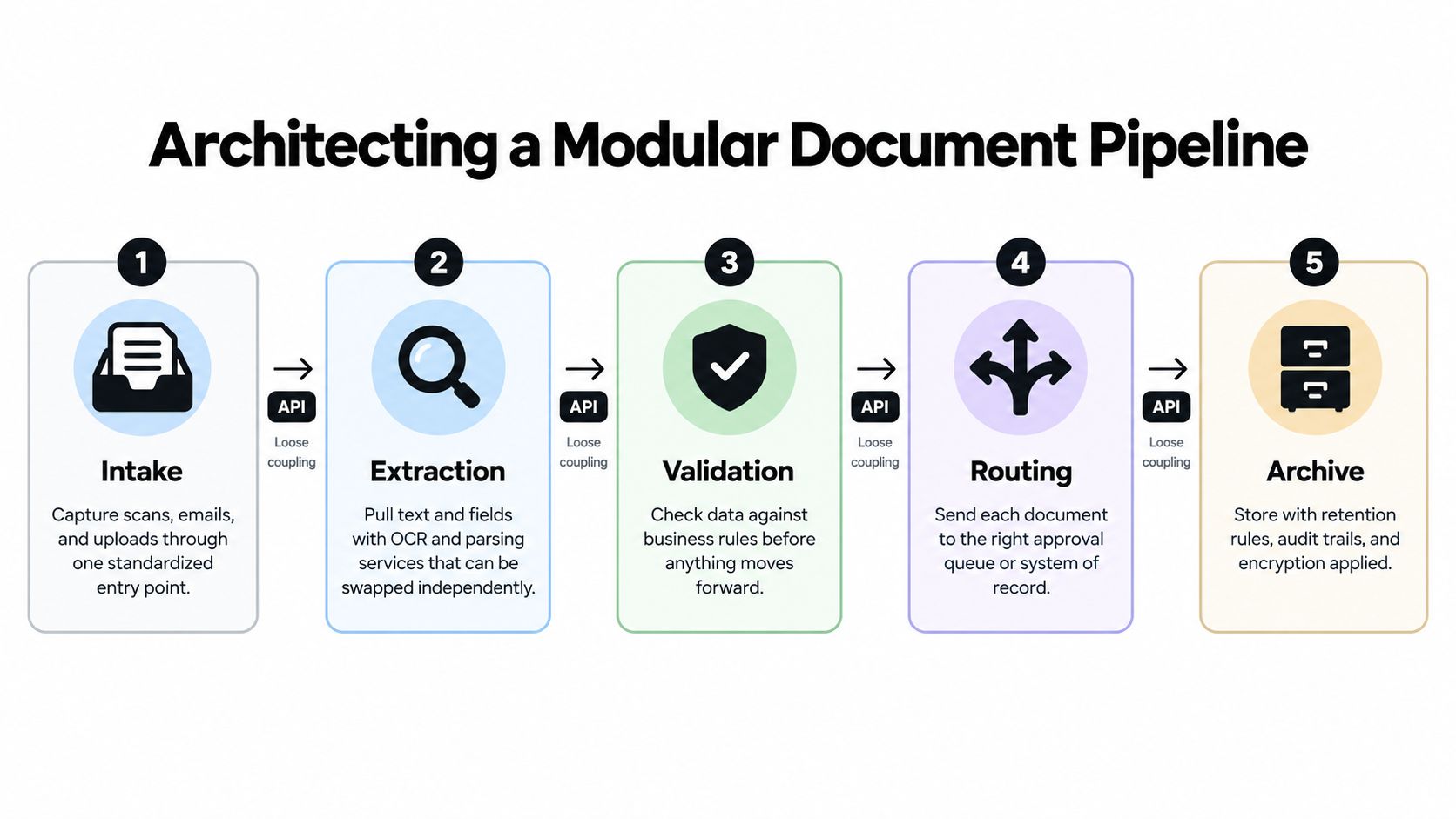
A reliable implementation should behave like a set of replaceable services, not a single end-to-end prompt. Separate ingestion, classification, extraction, validation, routing, and output so engineering teams can monitor each stage, test it independently, and replace a weak component without redesigning the entire process.
Design each stage around a contract
Intake accepts scans, email attachments, uploads, and API events. Normalize metadata at this boundary, including source, document type if known, candidate or employee identifier, and received timestamp.
Classification determines whether the file is a CV, interview note, invoice, contract, identity document, or an unfamiliar type. Don't let an uncertain classification automatically select a downstream workflow.
Extraction pulls text and fields using OCR, parsing, or an LLM service. Keep the extracted values separate from the original file, and retain enough provenance to show where each value came from.
Validation applies deterministic rules. Check dates, required fields, permitted countries, compensation formats, entity names, and consistency between the document and the system of record.
Routing sends the document to the appropriate approval queue or system. Routing rules should include escalation owners and timeout behavior, not only the destination.
Formatted output and archive produce the required contract, report, or record, then store it with retention rules, permissions, encryption, and an audit trail.
A documented on-premise implementation achieved 97.3% accuracy on predefined document types and 94.3% on previously unseen types with LLM-based routing. Smaller models achieved 96.7% and 91.7%, respectively, while taking less than half the processing time of the 70B model. The implementation study demonstrates why known and novel document classes must be measured separately.
Put uncertainty on the right side of the workflow
Use confidence thresholds to decide when software can proceed and when a person must review. A high-confidence CV can move to the correct requisition queue automatically. A document with an unfamiliar regional format, conflicting dates, or missing identity information should stop before it creates a bad record.
Human review isn't a failure of automation. It's a control for out-of-distribution cases. Store the model's classification, extracted values, confidence, validation result, and reviewer decision so operations teams can identify recurring failure patterns.
API boundaries also matter. A modular workflow needs clear schemas, idempotent processing, retry behavior, and traceable event identifiers. These details prevent duplicate records when a service times out or an event is delivered more than once. Engineering teams evaluating those interfaces can use these API design best practices as a reference point.
Navigating E-Signature and Data Compliance Requirements
Cross-border hiring needs a signature policy based on transaction risk, not convenience. The U.S. ESIGN Act, enacted in 2000, says an electronic signature or record can't be denied legal effect solely because it's electronic. The workflow still needs to establish signer intent, electronic consent, attribution, association between the signature and the record, and retention of a reproducible copy. Consumer transactions also require specified disclosures before electronic consent.
The European Union's eIDAS framework uses three signature tiers with different requirements and evidentiary consequences. A simple electronic signature has no prescribed technical requirements, while an advanced signature must identify the signatory, remain under the signatory's sole control, and detect later changes to the signed data. A qualified signature adds a qualified certificate and qualified signature-creation device, and has the equivalent legal effect of a handwritten signature across EU member states. The eIDAS signature framework explains those distinctions.
Match the control to the hiring transaction
The audit trail must preserve more than the final PDF. Record who initiated the document, which version was sent, delivery and viewing events, authentication method, signing intent, completion, download, revocation, and later actions. Useful fields include the signer's name and unique identifier, UTC timestamp with timezone information, source IP address, device or user-agent metadata where available, authentication method, and document hashes at signing and completion. Store those events in append-only or otherwise tamper-evident storage. Electronic-signature audit-trail requirements provide a practical event model.
GDPR-oriented automation also requires data minimization and retention controls. Each record should carry its purpose, legal basis, owner, retention or review date, and an exception path for litigation holds or statutory obligations. Applicant records, employment agreements, invoices, and identity documents shouldn't share one universal deletion rule.
Access logs and export functions support data-subject access requests, while deletion events demonstrate that expired records were handled. Teams operating in the United States can also consult this privacy compliance guide for founders when translating privacy obligations into operating controls. For broader hiring governance, this hiring compliance guide for HR leaders offers another practical reference.
Measuring Workflow Outcomes Beyond Task Speed
A parser can process a document quickly while the hiring workflow becomes slower. That happens when extraction creates more exceptions for recruiters, when legal receives incomplete contracts, or when a nearshore interviewer submits feedback that nobody owns.
Measure the workflow from trigger to completed outcome. A useful dashboard should show:
Straight-through processing rate: The share of cases that reach the correct destination without manual intervention.
Exception volume: Documents stopped by missing data, low confidence, validation failure, or unsupported format.
Rework time: Human effort spent correcting generated records, contracts, or routing decisions.
Waiting time between teams: Delays after one stage finishes and before the next owner acts.
SLA compliance: Whether contracts, checks, and feedback arrive within the agreed service window.
Audit completeness: Whether the record contains the required events, approvals, versions, and retention metadata.</li>
Establish the baseline before changing the process
Capture representative processing times and error rates before enabling automation. Record how many people touch each document, how often information is re-entered, how long approvals wait, and where cases return for correction.
The 2024 systematic review of electronic document management systems found that outcomes varied by methodology and organizational context, so a company should treat its own baseline as the comparison point. A workflow that lowers extraction time but raises downstream rework isn't delivering operational value.
Use separate dashboards for normal and exceptional paths. High straight-through processing can conceal a small but consequential set of rejected identity documents or incorrect employment entities. Track error rates by document class, country, template, and workflow stage where the risk warrants that detail.
Make ownership explicit for distributed teams
Asynchronous teams need stronger escalation rules because a stalled document may wait across several working windows before anyone notices. Every queue should have a named owner, a fallback owner, an escalation threshold, and a visible reason for the exception.
Nearshore hiring can improve collaboration across time zones, but it doesn't remove the need for clear ownership. The workflow should tell a recruiter whether HR, finance, legal, or the candidate must act next. That clarity matters more than optimizing one OCR call by a small margin.
Your Step-by-Step Adoption Checklist
Start with one high-volume workflow, not an enterprise-wide replacement. Onboarding packets or contract approvals are often easier to control than candidate evaluation because their fields, owners, and completion states are more explicit.
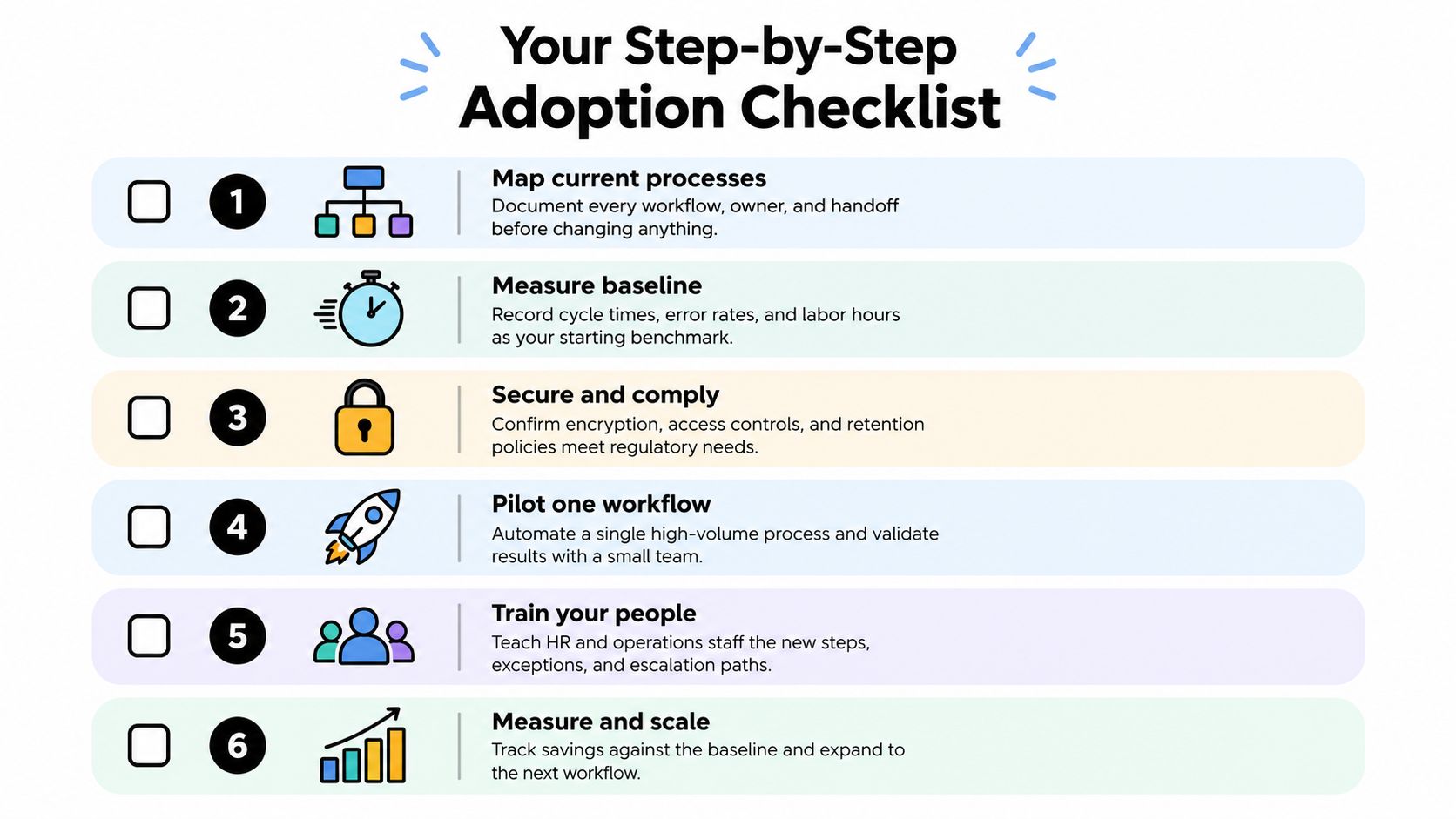
Map the current process. Document every trigger, document type, owner, handoff, approval, exception, and system of record.
Measure the baseline. Record cycle time, error rate, manual touches, labor effort, exception volume, and SLA performance before automation.
Secure and comply. Define document classifications, access controls, encryption, retention schedules, deletion events, signature requirements, and mandatory human review.
Pilot one workflow. Choose a process with repeatable structure and validate the normal and exception paths with a small operating group.
Train the people involved. Explain new responsibilities, confidence thresholds, escalation routes, and what staff must never approve automatically.
Measure and scale. Compare results against the baseline, inspect rework and exceptions, then expand only when the workflow remains controlled.</li>
Integrate with the existing ATS, HRIS, contract-management platform, storage system, and identity provider through explicit interfaces. Avoid creating another silo that merely moves documents faster. For teams building remote hiring operations in LATAM, this checklist for hiring remote LATAM talent can complement the workflow design.
When internal capacity is limited, specialized recruiting support can help separate the human sourcing and assessment work from the document controls. GENTY recruitment provides IT recruitment, RPO, staffing, and salary intelligence for companies building distributed technical teams, with processes designed to reduce resume overload while keeping hiring decisions accountable.
GENTY recruitment helps US and European tech companies build reliable nearshore hiring operations through skill-first IT and sales recruitment, RPO, staffing, and Talent Intelligence. If you're connecting document workflow automation to a growing cross-border hiring pipeline, visit GENTY recruitment to discuss the roles, process ownership, and delivery model your team needs.