
Technical screening is the early-stage process of verifying a candidate’s job-relevant technical skills before committing senior-engineer time to deeper interviews. The TL;DR verdict: run a technical screen after resume review and before any live engineering interview, especially when hiring across Argentina, Brazil, Mexico, and Colombia, where resume claims can be difficult to calibrate against US market expectations. Done right, it protects your most expensive resource (senior engineers), reduces false positives, and compresses the hiring funnel by filtering unqualified applicants before they reach your team.
A well-structured technical screen typically includes:
- A short automated coding exercise of moderate length, done asynchronously
- A system-design mini-task or architecture prompt
- A take-home assignment for senior or staff-level roles
- An asynchronous video or AI-assisted assessment for communication signals
What does a technical screen actually measure?
The purpose of technical screening goes well beyond checking whether a candidate can write a loop. A screen that predicts on-the-job performance evaluates multiple dimensions simultaneously.
Core assessment dimensions:
- Problem decomposition: Can the candidate break an ambiguous prompt into tractable sub-problems? This signal matters more than any single correct answer.
- Code fluency: Does the candidate write idiomatic, readable code, or do they produce something that technically works but no teammate would maintain?
- Correctness and edge-case handling: Does the solution account for null inputs, boundary conditions, and error states?
- Reasoning under pressure: How does the candidate respond when they hit a wall? Do they ask clarifying questions or freeze?
- Communication: Can they explain their approach clearly, even in writing or asynchronously?
- Technical taste: Do they recognize trade-offs between approaches, or do they reach for the first solution that compiles?
Role level shifts which dimensions carry the most weight. For a junior engineer in Bogotá or Mexico City, correctness and code fluency are the primary signals. For a senior backend engineer in Buenos Aires or São Paulo, decomposition, taste, and communication dominate. Staff and architect-level screens should include a system-design component that tests how candidates reason about distributed systems, failure modes, and organizational constraints.
Need help hiring?
See the next step after this guide
If this topic is relevant to your team, these are the most useful pages to check next.
Non-code technical checks matter too. For DevOps roles, a debugging or infrastructure task (e.g., diagnosing a broken CI/CD pipeline from logs) is more predictive than a LeetCode problem. For data engineering roles, a SQL transformation or pipeline design prompt surfaces practical ability faster than an algorithm question.
Which screening format fits your hiring situation?
Choosing the right format depends on role level, hiring volume, and how much candidate experience you want to protect. The table below maps the most common formats to practical use cases.
Pros and cons by format:
- Automated async test: Scales to hundreds of candidates with no engineering time; removes scheduling friction for LATAM candidates across EST/PST time zones. The downside is that it can miss communication signals and rewards test-prep over genuine ability.
- Timed live screen: Produces strong signal on reasoning and communication. Requires an engineer’s time and introduces interviewer-specific variance if rubrics are not calibrated.
- Take-home project: Closest to real work; excellent for senior hires. Disadvantages candidates who cannot dedicate a weekend afternoon, which can skew against caregivers and candidates with second jobs.
- Micro system-design exercise: Efficient for senior roles; surfaces architectural thinking in under an hour. Requires a well-written prompt to avoid ambiguity.
- AI-assisted interviewer: AI tools can scale screening significantly, but they must be configured to evaluate reasoning and communication, not only whether unit tests pass.
For high-volume hiring (20+ roles per quarter), an automated async test as the first filter is the only approach that keeps engineering hours manageable. For a product-team senior hire, a take-home or live screen produces better signal. Always communicate AI rules explicitly: tell candidates whether they may use GitHub Copilot, ChatGPT, or similar tools, and what the expectation is around attribution. Ambiguity here creates candidate frustration and invalidates your signal.
Where does technical screening fit in your hiring funnel?
The structured three-stage screening funnel that produces the most reliable results looks like this:
Resume screen → Automated technical screen → Recruiter/hiring manager phone screen → Live technical interview → Onsite or offer
Ownership at each stage matters as much as the sequence. Recruiters own sourcing, ATS workflows, and the initial resume filter. An automated tool (or GENTY recruitment’s asynchronous code assessment layer) handles the baseline technical evaluation. Senior engineers enter the process only at the live deep-dive stage, after a candidate has already demonstrated baseline competency. This sequencing is the single most common mistake companies get wrong: they put a senior engineer on a 45-minute call with every applicant who passes a resume screen, burning hours on candidates who could have been filtered in 30 minutes by an async test.
Timeline guidance per stage:
- Automated screen: candidate completes within 48–72 hours of invitation; results available immediately
- Recruiter phone screen: 20–30 minutes; scheduled within 3–5 business days of passing the async screen
- Live technical interview: 60–90 minutes; scheduled within 5–7 business days of the phone screen
For LATAM candidates in Argentina, Brazil, Mexico, and Colombia, timezone scheduling is straightforward. Buenos Aires (ART) is UTC-3, São Paulo (BRT) is UTC-3, Mexico City (CST) is UTC-6, and Bogotá (COT) is UTC-5. All four overlap comfortably with US Eastern (UTC-5) and Pacific (UTC-8) business hours, meaning a 9 AM PST standup is 12 PM in Mexico City and 1 PM in Bogotá. Set explicit response SLAs in your candidate communications (e.g., “please complete the assessment within 48 hours”) and confirm timezone in the invitation to avoid scheduling confusion.
How to design a technical screen that actually predicts performance
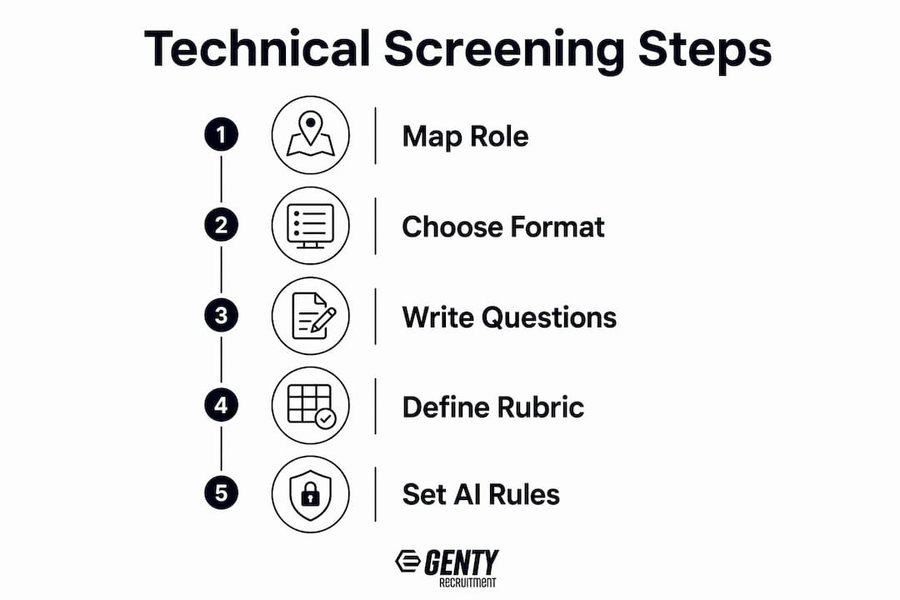
A well-designed technical screen runs about an hour, focuses on real-engineering problems, and uses a written rubric with multiple scored dimensions. Here is a replicable six-step process.
Step 1: Map the role to 3–5 job-critical competencies. For a backend engineer, those might be: API design, data modeling, error handling, code readability, and system-design reasoning. Write these down before you write a single question.
Step 2: Choose the right format and time budget. A live screen of roughly an hour suits mid-to-senior roles. For high-volume junior hiring, an asynchronous short coding test scales without engineering overhead. Match the format to the role, not to what is easiest to schedule.
Step 3: Write questions that surface decomposition, adaptability, and taste. Avoid pure algorithm memorization prompts. A better prompt: “Given this simplified event log schema, write a query that identifies users who completed checkout but never returned within 30 days. Walk me through your assumptions.” That question tests SQL fluency, business reasoning, and communication simultaneously.
Step 4: Write the rubric before the first interview. Define what a 1, 3, and 5 look like for each competency dimension. Calibrate with a sample response (even a synthetic one) so every interviewer scores against the same standard.
Step 5: Decide AI rules explicitly. State in the candidate invitation whether AI coding assistants are permitted, restricted, or expected. If you allow them, note that the candidate should explain their reasoning, not just paste output.
Step 6: Measure pass rate and tune difficulty. Target a pass rate that indicates your screen is filtering candidates appropriately without being exclusionary. If too many candidates pass or too few do, adjust prompt difficulty accordingly.
Screening design checklist:
- [ ] Competency model written and tied to job description
- [ ] Format selected and time budget defined
- [ ] Questions reviewed for memorization traps
- [ ] Rubric written with scoring bands before first use
- [ ] AI policy stated in candidate invitation
- [ ] Pass rate tracked and reviewed after every 10 completions
Pro Tip: Never use a live senior-engineer session as your first filter. Insert an automated asynchronous assessment between the resume screen and the live interview. This single change typically recovers 4–8 hours of engineering time per open role.
A sample rubric and screening checklist you can copy today
The rubric below applies to a 45–60 minute technical screen for a mid-to-senior software engineer. Score each dimension on a 1–5 scale, where 1 = does not meet bar and 5 = exceeds bar clearly.
One-page screening checklist:
- [ ] Role brief shared with all interviewers before the screen
- [ ] Time budget confirmed in candidate invitation (e.g., 45 minutes)
- [ ] AI policy stated explicitly (permitted / restricted / expected)
- [ ] Rubric distributed to all scorers before the screen begins
- [ ] Candidate data handling and anonymization policy confirmed
- [ ] Interviewer notes submitted within 24 hours of the screen
- [ ] Pass/fail decision documented with rubric scores, not narrative only
For calibration, run a 30-minute session with your interviewers before the first live screen. Score the same sample response independently, then compare. Disagreements of 2+ points on any dimension signal that the rubric needs sharper language. Calibration sessions catch “vibes” scoring before it contaminates your pipeline.
What candidates will do and how to make the screen fair
Candidates preparing for a technical screen typically set up their local development environment, choose a preferred programming language, and review the problem statement before writing a single line. Giving them the right pre-screen information makes the screen more predictive, not easier.
What to communicate before the screen:
- Exact time budget (e.g., “you have 45 minutes from when you start the assessment”)
- Allowed tools: IDE, documentation, AI assistant (yes/no), Stack Overflow
- A sample input/output pair so candidates understand the expected format
- A one-paragraph rubric summary so they know what you are evaluating
- For take-homes: a realistic time estimate and a hard deadline
Sample question set for a 45–60 minute screen:
- Junior (coding prompt): “Write a function that takes a list of transaction amounts and returns the running balance after each transaction. Handle negative balances explicitly.”
- Intermediate (parsing/transform): “Given a JSON log of API events, write a script that groups events by user ID and returns the count of unique endpoints each user hit in the last 24 hours.”
- Senior (system-design micro-task): “You are designing a notification service that must deliver messages to 10 million users within 5 minutes of an event. Walk me through your architecture, the trade-offs you see, and what you would validate first.”
For LATAM candidates, include timezone in the take-home deadline (e.g., “submit by Friday 5 PM EST / 2 PM PST”). Candidates in Buenos Aires, São Paulo, Mexico City, and Bogotá are accustomed to working with US teams, but explicit timezone references prevent ambiguity. State the language expectation clearly: most LATAM engineers hired by US companies communicate in English, but confirming this upfront avoids surprises.
Common pitfalls and how to avoid them
The most expensive mistake in technical screening is using a live senior-engineer session as the first filter. A 60-minute call with every applicant who passes a resume screen can cost a team dozens of engineering hours per quarter, with no guarantee those candidates cleared even a basic competency bar.
Other common pitfalls:
- Memorized-algorithm traps: Prompts that test whether a candidate has seen a specific LeetCode problem, rather than whether they can reason. Replace with real-world, role-relevant problems.
- Unclear AI rules: Candidates who use AI tools when they were not supposed to, or who avoid them when they were allowed, both produce invalid signals. State the policy in writing.
- Inconsistent rubrics: When two interviewers score the same candidate 2 and 5 on the same dimension, the rubric is not calibrated. Run calibration sessions before each new role.
- Single-language requirements: Requiring a specific language (e.g., Java only) for a role where the team uses multiple languages filters out strong candidates unnecessarily.
Bias mitigations:
- Use structured rubrics with defined scoring bands, not narrative-only feedback
- Blind scoring where possible: remove candidate names from code submissions before review
- Assemble diverse calibration panels; a homogeneous panel tends to penalize unfamiliar communication styles
- Provide standardized instructions in English, Spanish, or Portuguese as appropriate for your LATAM candidate pool
Pro Tip: If your pass rate feels consistently too low or too high, run a diagnostic before your next hiring cycle. Extremely low pass rates may mean the prompt is too difficult for the targeted role; very high pass rates may signal the need for greater challenge or stricter rubric criteria.
For legal and compliance requirements when using third-party assessment platforms, confirm that the vendor is compliant with applicable data privacy regulations (GDPR for European candidates, CCPA for California-based applicants), that candidate data is not retained beyond the hiring decision without consent, and that the assessment does not create disparate impact on protected groups. Document your screening criteria and scoring decisions in case of an audit.
How GENTY recruitment runs technical screening for LATAM hires
GENTY recruitment uses a layered, automated-first screening model designed to protect senior-engineer time while producing high-confidence shortlists within 7 days. The funnel runs: AI resume pre-filter → asynchronous code assessment → calibrated live screen with a GENTY recruitment technical specialist. Clients receive a curated shortlist of pre-vetted candidates, each with rubric scores and interviewer notes, before their engineering team meets a single candidate.
The fixed-fee model means clients know the cost per hire upfront, with no upfront payment and a 3-month replacement guarantee. For companies scaling engineering teams across multiple LATAM markets simultaneously, this structure removes the financial risk of a bad hire.
Approximate mid-level engineer salary ranges (USD, annual) by country:
These ranges reflect remote compensation for engineers working with US-based product teams. Compared to US market rates for equivalent roles, LATAM hires typically represent savings of up to 40%, with no meaningful timezone penalty for teams operating on EST or PST.
Checklist for engaging GENTY recruitment’s screening service:
- [ ] Share the job description and competency model with GENTY recruitment
- [ ] Confirm the seniority level and preferred tech stack
- [ ] Agree on the screening format (async test, live screen, or both)
- [ ] Review and approve the rubric before the first candidate is assessed
- [ ] Confirm AI policy and language expectations for the role
- [ ] Set a target shortlist date (GENTY recruitment’s standard is 7 business days)
GENTY recruitment’s applicant screening workflow for LATAM hires includes timezone-aware scheduling, bilingual candidate communications, and structured rubric scoring at every stage.

Legal compliance and data privacy in technical screening
Technical screening generates candidate data, and how you collect, store, and use that data carries legal obligations. In the United States, the Equal Employment Opportunity Commission (EEOC) requires that pre-employment assessments do not create unlawful disparate impact on protected classes. If a screening tool systematically filters out candidates of a particular race, gender, or national origin at a higher rate than others, the employer bears the burden of demonstrating the tool’s job-relatedness and business necessity.
For companies hiring LATAM candidates who are located in the European Union or who are EU citizens, the General Data Protection Regulation (GDPR) applies to how candidate data is processed. Candidates have the right to know what data is collected, how long it is retained, and whether automated decision-making is involved. If your screening platform uses AI scoring, you may need to provide candidates with an explanation of how the score was generated.
California-based employers must also comply with the California Consumer Privacy Act (CCPA), which grants candidates rights over their personal information. Third-party assessment vendors should provide a Data Processing Agreement (DPA) confirming their compliance posture.
Practical steps for compliance:
- Document the job-relatedness of every screening criterion before the first candidate completes the assessment
- Confirm your assessment vendor’s GDPR and CCPA compliance status in writing
- Set a data retention policy: most legal guidance recommends deleting candidate assessment data within 12 months of the hiring decision
- Inform candidates in writing that their responses may be scored by automated tools, and provide a human review option where required by law
This article provides general information about technical screening practices and is not legal advice. Consult qualified legal counsel for guidance specific to your jurisdiction and hiring situation.
Key Takeaways
A structured technical screening process, built on an automated-first funnel and calibrated rubrics, protects senior-engineer time and produces more reliable hiring signals than unstructured interviews alone.
Why the “screen fast, screen early” logic is more nuanced than it sounds
There is a version of technical screening advice that reduces to: automate everything, filter hard, move fast. That framing is partially right and partially dangerous.
The automation-first funnel genuinely works. Inserting an async assessment between the resume screen and the first live call is one of the highest-ROI changes a hiring team can make. The engineering hours recovered are real, and the signal quality from a well-designed async test is surprisingly high for junior and mid-level roles.
Where the logic breaks down is at the senior and staff levels. A 45-minute LeetCode-style test is a poor predictor of whether a principal engineer will make good architectural decisions, mentor effectively, or communicate clearly with product leadership. For those roles, the screen needs to be qualitatively different: a system-design prompt, a debugging exercise on a realistic codebase, or a structured conversation about past technical decisions. Automating the wrong thing at the senior level produces false negatives at exactly the point where a bad hire is most costly.
The LATAM context adds another layer. Engineers in Argentina, Brazil, Mexico, and Colombia are often evaluated against US market standards without calibration for local norms. A candidate from Buenos Aires who writes excellent Python but structures their explanation differently than a US-trained engineer is not a weaker candidate. Rubrics that score communication on US-centric norms introduce bias that has nothing to do with technical ability. The fix is calibration: include LATAM-based engineers or interviewers in your calibration sessions, and review your rubric’s communication dimension specifically for cultural assumptions.
Speed and fairness are not in conflict when the process is designed carefully. The goal is a screen that is fast for your team, fair for candidates, and predictive of actual job performance.
GENTY recruitment handles the screening so your engineers can focus on building
Hiring pre-vetted engineers from Argentina, Brazil, Mexico, or Colombia should not mean rebuilding your screening process from scratch. GENTY recruitment’s IT recruitment service runs the full technical screening funnel on your behalf: AI resume pre-filter, asynchronous code assessment, calibrated live screen, and rubric-scored shortlist, all delivered within 7 business days. Clients save up to 40% compared to equivalent US hires, with full EST/PST timezone alignment and no upfront payment.
For teams scaling across FinTech, SaaS, AI, or Web3, GENTY recruitment also offers recruitment process outsourcing for companies that want to hand off the entire screening operation, not just individual roles. Fixed-fee pricing per seniority level means no surprise costs, and the 3-month replacement guarantee removes the financial risk of a mis-hire. To scope a pilot or request a salary benchmarking report for your target LATAM market, contact GENTY recruitment directly at gentyrecruitment.io.
Useful sources
The following sources informed this article and are recommended for deeper reading:
- Oleeo: What is Technical Screening? — Clear definition of technical screening, the “resume gap” problem, and why standardized screens reduce bias. Good starting point for teams new to structured screening.
- JobsByCulture: How to Design a Technical Screen That Actually Predicts Performance — Practical design checklist covering rubric structure, pass-rate calibration, and question design for high-predictive validity screens.
- HackerRank: AI Interviewer for Technical Screening — Practical guide for engineering teams on configuring AI interviewers to evaluate reasoning and communication, not just test correctness.
- SkillBrew.AI: The Technical Screening and Assessment Playbook for High-Volume Hiring — Three-layer playbook (AI resume screening, proctored assessments, structured first-rounds) for teams hiring at scale.
- InCruiter: Technical Screening Guide — Explains the layered funnel approach and why automated-first screening protects senior-engineer time.
- Hackajob: Technical Assessment Preparation — Candidate-facing guide on what to expect; useful for hiring teams who want to understand the candidate experience and write better pre-screen instructions.
- Columbia CCE: Prepare for a Software or Technical Interview — Authoritative candidate-prep resource from Columbia University’s career education center; covers environment setup, sample questions, and clarifying-question strategies.